Account for a school change
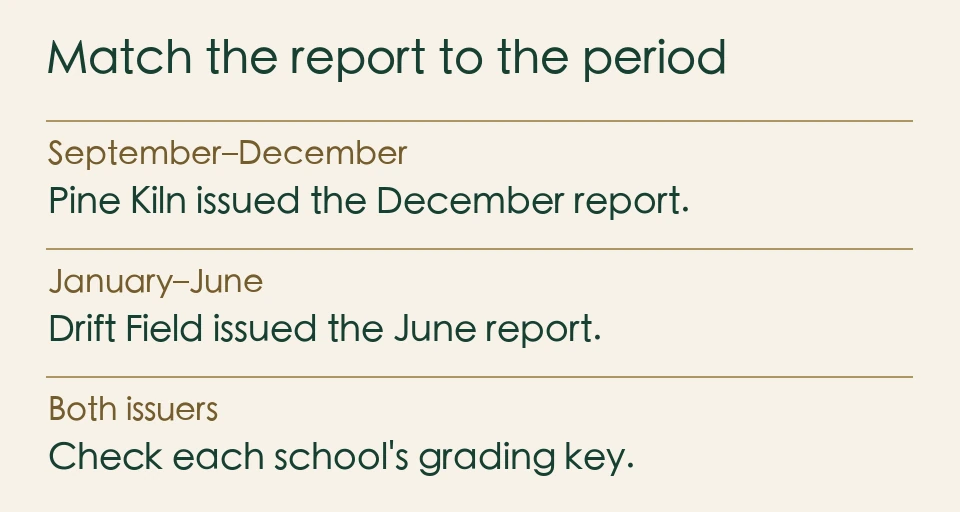
Create one line per term with the dates, issuing school and filename. When a student moves midyear, a current-school report may cover only part of the period admissions asked for. Look for the record produced by the previous school.
Read beyond the grades
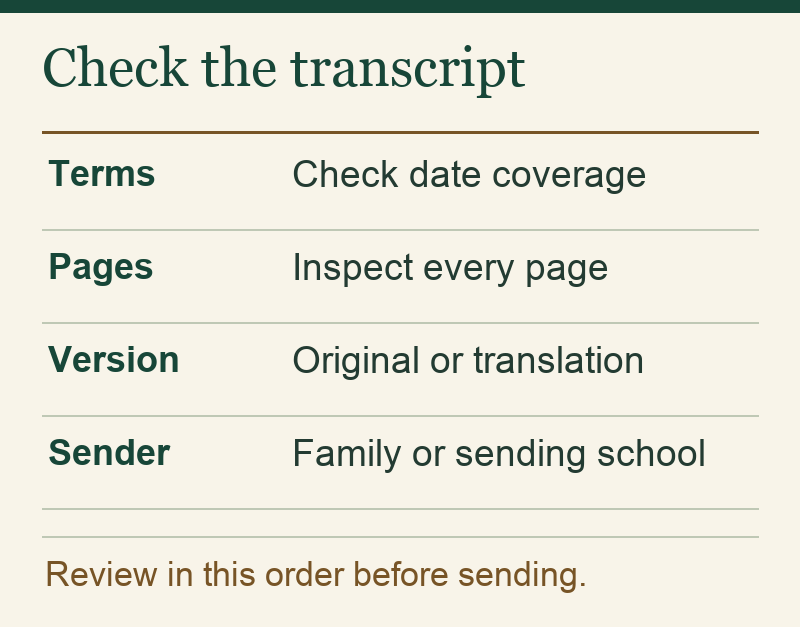
Open the first and last pages and check the student identifier, reporting period, school heading and page sequence. A missing grading key can make an otherwise sharp scan difficult for another school to interpret.
Follow the delivery instruction
Some requests name the previous school as sender. Some accept a family upload. Record the route for this application and check how translations must accompany the original if a translation is requested.
Give a precise repair request
Tell the family exactly which page or period needs attention: “We have the autumn report and the grading scale. Please rescan the bottom half of the spring report, including the school heading.” Keep the earlier record until the replacement opens correctly.
Turn the school's wording into a request you can test
Read the instruction with the family before asking anyone to scan more paper. “Two most recent reports”, “the last two academic years” and “a final transcript from the previous school” describe different sets of documents. Copy the words that determine the period and the issuer. If the instruction says “recent” without defining it, ask admissions which reports it expects for the proposed start date. Otherwise a family could spend a week trying to replace a report the school never needed.
Record where the requirement came from. A portal item may use a short label while an invitation gives detailed delivery instructions. Read both together and check that the invitation relates to the right campus, child and intake. If the portal asks for an upload and the message requests school-to-school delivery, do not solve the apparent contradiction by sending the same record through every channel. Ask whether one is a review copy and the other the formal record. Keep the answer beside that school's document checklist.
Lay the reports out in time order
Use one row for each period the school asked to see. Put the issuing school, start month, end month and the report you hold on the same line. A student who moved in February might have an autumn report from the old school, a leaving report covering the early weeks of the next term and a summer report from the new school. Two documents labelled “term two” can refer to different calendars. Use the months to see whether the apparent overlap is real.
If a student was not enrolled for part of the requested period, say so in the working record and ask the family what account of that interval is accurate. Admissions can then say what explanation or alternative it will accept. A gap in schooling is different from a gap in the files. One cannot be repaired by scanning a page; the other may be resolved in minutes. Ask the family only for evidence that exists or that an identified issuing office can supply.
When a report covers more than one term, examine its headings before counting it twice. A final report may show cumulative grades for an entire year or final grades for the most recent term alone. Ask the issuing school what a heading means if the document does not explain it. Give the receiving office the school's own wording. Avoid turning a cumulative average into three invented term marks to fill three rows of a form.
Inspect a copy as if you were the person receiving it
Open the actual attachment from the case, rather than the image preview in a message thread. Read the student's name, school heading, year label and report dates. Check each page upright at a normal reading size. Look for a missing reverse side, a corner cut off at the scanner, a page saved twice or a grading scale detached from the table it explains. If a printed sequence reads one of four, two of four and four of four, ask specifically for page three. A neat cover page cannot resolve that gap.
Take a second look at symbols and comments. A dash may have a defined meaning in the grading key. It could also indicate a subject the student did not take during that period. Leave the symbol as issued and seek clarification where it affects the application. Do not substitute a zero or translate a teacher comment into a numerical grade. The adviser can organise a legible, complete record while leaving the assessment to its author and the receiving school.
If the student uses a different name at school, check what the family and school have authorised you to give the recipient to associate the two names. Avoid editing the name on the report. If a correction to an official record is needed, ask the issuing office to make it. Where two siblings share a surname and a family contact, read the first name and report year again after opening the attachment. The filename alone offers little protection against putting the right report into the wrong application.
Route the original and translation as a pair
Find out whether the school wants the report in its issued language, a translation or both, and whether it specifies who may translate. A bilingual report issued by the school may answer the question without a separate translation. Ask before committing the family to extra work. If a translation is required, make sure the period and page sequence correspond to the exact version being supplied. A translation prepared before a corrected final page was issued can disagree with an otherwise complete original.
Mark who may send each piece. The family might upload a translation while the registrar sends the original directly. Ask where evidence of receipt will appear and who will check. If a registrar can release the record only after the family has signed an authorisation, explain that dependency to the parent and agree who will return the form. A covering adviser needs those instructions and the contact details; there is no need to distribute the student's entire academic history to everyone involved.
Fictional example: three reports, two calendars and one missing page
A child in this fictional case left Pine Kiln School in December and joined Drift Field School in January. The receiving school, Reed Terrace, asks for the reports covering September through June, plus the grading key for each issuer. A parent supplies a December report from Pine Kiln and a file called “Full year” from Drift Field. The adviser opens the latter and finds that it covers January through June. The two files together cover the requested months, even though neither file on its own spans a full year.
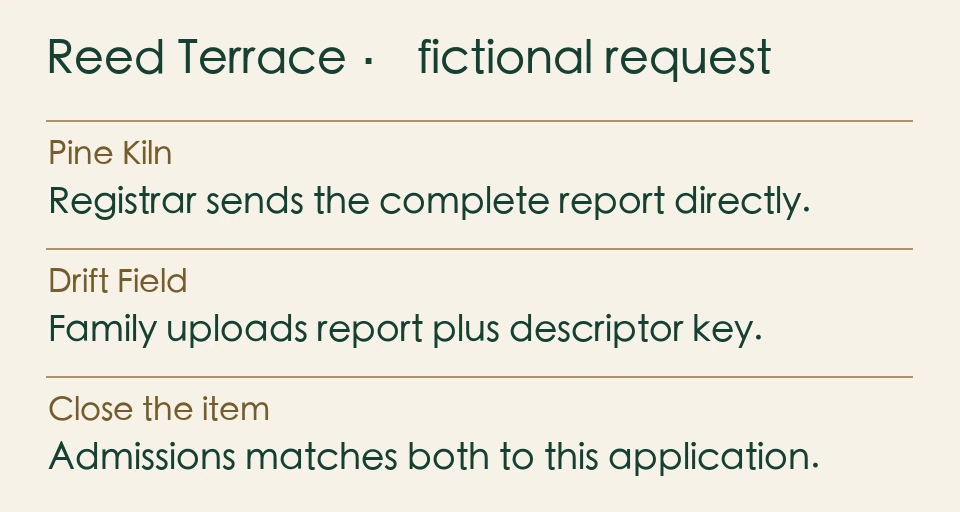
The December report is numbered one through three, but the scan contains pages one and three. Page three contains the grading key. The Drift Field report ends with a note saying its descriptors are explained on the reverse; the reverse is absent. The adviser writes two requests: “Could Pine Kiln supply page two of the December report?” and “Could Drift Field provide the descriptor key printed on the reverse of the June report?” The parent knows precisely which items to ask for and has no reason to order another calendar year of records.
Reed Terrace replies that the Pine Kiln record must come from its registrar, while the family may upload the Drift Field report and key together. With family authorisation, the registrar sends the complete December report directly. The family obtains the missing reverse and checks that the key applies to the June report. Before uploading, the adviser reopens the combined file and reads its first and last pages aloud with the parent. They retain the submission acknowledgement for that upload.
The following morning Reed Terrace confirms it has matched the registrar's message and the family upload to the application. The adviser can now tell the family: “Both reporting periods and both grading keys are on file. No further transcript action has been requested.” If only the upload receipt had arrived, the update would instead identify the registrar's record as awaiting confirmation. A parent's copy of the sent message can establish dispatch without establishing the school's matching decision.
Ask for the smallest repair and recheck the replacement
A repair message can read: “We can read the student name and all subject grades on the current scan. The lower edge of the final page cuts off the date and school stamp requested by admissions. Please ask the issuer for a complete copy of that page, and let us know whether it will send the formal copy directly.” Tailor the request to the defect and to the actual delivery instruction. There is little value in asking the family to resend an entire folder when the only missing piece belongs with the registrar.
When the replacement arrives, compare it with the earlier copy before setting it aside. Confirm the new page belongs to the same issue date, student and report. Then check the file that will really leave your hands, including its page order and any size limits the receiving channel states. After submission, keep the acknowledgement with the relevant application and distinguish a file uploaded, a record received and a record accepted for review. Those distinctions determine whether the next call belongs with the family, the issuing school or admissions.
One practical test for a replacement is to ask someone to locate the grading key from the first page alone. If the key is in a separate file with no school name or issue date, ask the issuer how the recipient can identify the pair. That small check helps admissions interpret the grades even after it has downloaded several documents from the same application.