
Home / Parent progress reports
Mac desktop edition
What does the family still need to send?
When one student applies to two schools, “we have the transcript” is only half an answer. Choose the school first. Its report gives the family a dated list of what has arrived and what to do next.
Open the sample PDF in Chinese →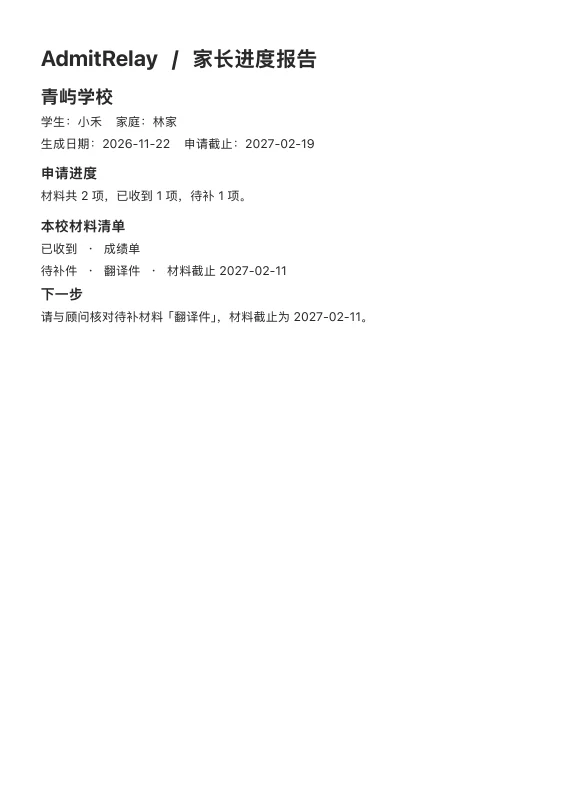
Start with one application
Choose the family and student in the desktop workspace. In the school selector, open the application you are discussing, then choose Preview parent report (预览家长报告). Check the names and application deadline before saving the PDF.
Read the Qingyu example
The report for 青屿学校 lists two items for 小禾. The transcript has arrived. Its translation is outstanding and due on 11 February 2027. The school application is due on 19 February. The family can see which date to act on first.
What the PDF contains
The heading identifies the school, student and family. The generation date puts the update in time. Each checklist row shows its status and any recorded material deadline. The final section calls out the earliest dated missing item. When all items are in, it asks the family to check submission status with the adviser.
What stays in the casebook
Attachments, their filenames, the internal activity log, the assigned adviser and other schools’ records stay out of the report. Check the student and family aliases and every material label before export. These entries appear as entered. Once saved, the PDF is a separate file you choose how to deliver.