
Home / Local case files
Mac desktop edition
Keep the right file with the right school.
A student may send two documents with the same filename for different applications. In AdmitRelay, each attachment belongs to a material on a particular school’s checklist. Open the student, choose the school and inspect that copy.
See the two-school workflow →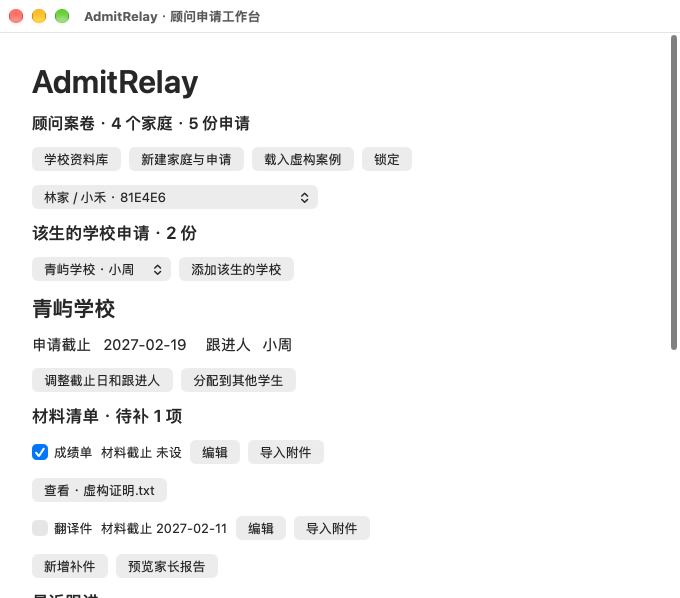
Choose the material first
Open the application, find the material and choose Import attachment (导入附件). A transcript for one school and a transcript for a second school can carry the same filename. Each school keeps its own copy and received status. After import, confirm the checklist status separately.
What you can archive
Import a nonempty PDF, JPG, PNG or UTF-8 text file up to 4 MiB per file. Password-locked PDFs are rejected. Use the View control beside the material to inspect the stored copy. Moving the source file later leaves that copy available in the unlocked casebook.
Locking the local casebook
Set a local password of at least eight characters. The Mac app encrypts the casebook with AES-GCM, including imported file contents. Lock the workspace when you leave and use that password to reopen it. Keep your password safe: this build has no password recovery.
Know which copy you are handling
Encryption covers the casebook on this Mac. Source documents and exported parent PDFs are separate files wherever you saved them. The assigned adviser is a handover label. This local workflow suits a single workstation; team permissions and cross-device sharing are outside the scope of this build.